Licensing & Support
License plans, pricing, activation, renewal, and how to get help from the Samridhhi team.
How licensing works
- One device per license — each key activates one Windows PC unless your agreement states otherwise.
- Local business data — invoices, stock, and accounts stay on your computer; the licensing service handles registration, activation, and validation.
- Internet for licensing — activation and periodic validation need network access; day-to-day billing can work offline with a valid cached license.
- Plan tier — Standard covers core billing and inventory; Professional adds advanced reports, OCR import, and Samridhhi AI (see feature lists below).
- Lifetime — Professional — Lifetime uses server-confirmed lifetime entitlement (non-expiring per the license agreement), not merely a missing expiry date in the app.
License plans and pricing
Free trial
| Plan | Price | Term | Devices |
|---|---|---|---|
| Free Trial | ₹0 | 30 days, full features | 1 |
Register at Free Trial to receive a license key by email. Trial ends after 30 days; upgrade to a paid plan to continue.
Trial includes: billing and invoices, products and inventory, customers and suppliers, purchases, payments, business reports, online license validation, data stored on your PC only.
Standard plans
Core business features for shops and small businesses (billing, inventory, purchases, payments, reports).
| Plan | Price (INR) | Term | Devices |
|---|---|---|---|
| Standard — Monthly | ₹199 | 30 days | 1 |
| Standard — 3 Months | ₹499 | 3 months | 1 |
| Standard — 6 Months | ₹799 | 6 months | 1 |
| Standard — 1 Year | ₹3,999 | 1 year | 1 |
Renew before expiry to continue uninterrupted use. Renewal wording follows the then-current Standard price shown at purchase.
Professional plans
Everything in Standard, plus advanced reports, OCR-based invoice and product import, and the Samridhhi AI business assistant.
| Plan | Price (INR) | Term | Devices |
|---|---|---|---|
| Professional — Monthly | ₹299 | 30 days | 1 |
| Professional — 3 Months | ₹799 | 3 months | 1 |
| Professional — 6 Months | ₹1,299 | 6 months | 1 |
| Professional — 2 Years | ₹7,999 | 2 years | 1 |
| Professional — 5 Years | ₹15,999 | 5 years | 1 |
| Professional — Lifetime (recommended) | ₹25,999 | Lifetime entitlement | 1 |
Professional — Lifetime is a one-time payment with non-expiring lifetime entitlement as defined in the license agreement. Longer fixed-term Professional plans renew at the end of their term unless you upgrade or purchase a new key.
Choosing a plan
- Try first — use the 30-day trial on one PC to evaluate workflows.
- Standard — if you need reliable billing, inventory, and GST-style reporting without AI or OCR.
- Professional — if you want Samridhhi AI, OCR bill import, and advanced analytics.
- Lifetime — if you prefer a single purchase for long-term Professional use (confirm current offer on Pricing).
To buy or enquire, use Pricing, email sales@samridhhi.co.in, or Request a Demo. Online checkout appears on the website only when enabled for a plan.
Activate a license
- Register online for a free trial key, or use the key sent after purchase.
- Install Samridhhi from Download and launch the app.
- Accept the End User License Agreement when prompted.
- Enter your license key (format such as
SAMR-XXXX-XXXX-XXXX-XXXX) and click Activate. - The app validates with the licensing server and binds the key to this device.
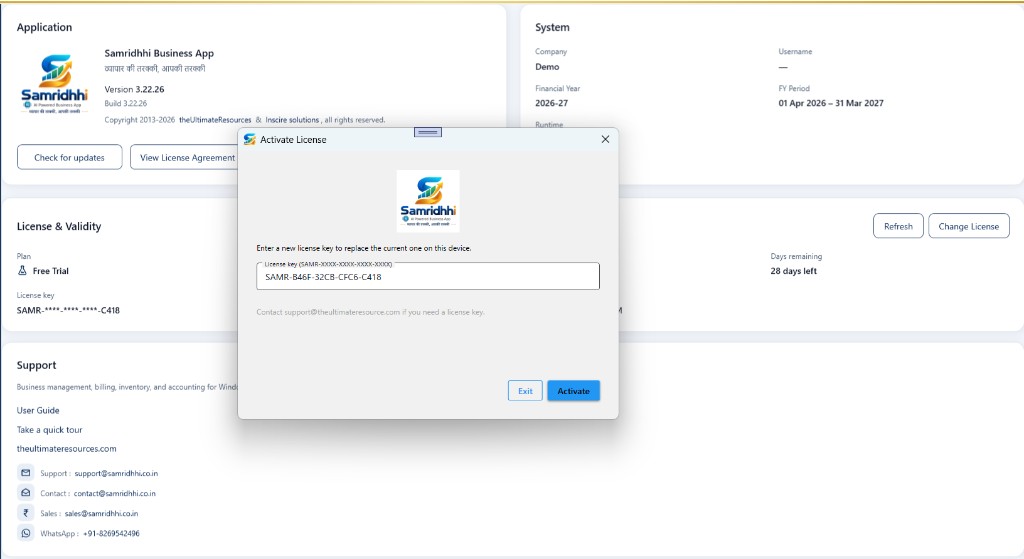
Manage your license in the app
Open Settings → About → License & Validity:
- Plan — human-readable plan name from the server (for example Professional — Lifetime).
- Status — such as Active; revoked or expired licenses block use after server confirmation.
- Valid until — expiry date for time-limited plans (lifetime plans show no expiry date when entitlement is confirmed).
- Days remaining — countdown for term licenses.
- License key — masked in the UI; do not share your full key publicly.
- Max devices / Last checked — device allowance and last successful validation time.
Refresh — immediately re-validates with the licensing server and updates plan, status, and expiry (use after purchase or if status looks stale).
Change License — replace the key on this device (upgrade, renewal key, or moving from trial). Activate, then confirm License & Validity reflects the new plan.
View License Agreement — read the terms governing use of the product.
Check for updates — install app updates when your license allows update notifications.
Renewal, expiry, and revoked licenses
- Time-limited plans stop working after expiry unless you renew or enter a new key.
- The app may use cached license status briefly when offline; revoked or expired licenses are enforced when validation succeeds online.
- Replacing a PC typically requires activating again on the new machine; contact sales if you need to move a paid license.
- Keep your key private. Only activate keys issued to you or your organization.
Useful shortcuts
| Shortcut | Action |
|---|---|
| Ctrl + K | Global search |
| Ctrl + S | Save current form |
| Ctrl + P | Print (when available) |
Get help
Our team can help with trials, plan choice, purchase, installation, activation errors, and technical issues.
| Channel | Best for | Contact |
|---|---|---|
| Quick questions, pricing, install help | +91-8269542496 | |
| Sales | Plans, quotes, upgrades, lifetime offer | sales@samridhhi.co.in |
| Contact | General enquiries | contact@samridhhi.co.in |
| Support | Technical issues, activation failures | support@samridhhi.co.in |
| Publisher support | Legacy / alternate support address shown in app | support@theultimateresource.com |
| Web | Demo request, contact form | Contact page · Request a Demo |
When emailing support
Include:
- Application version and build (Settings → About → Application).
- License plan and status (License & Validity — do not paste your full license key in public tickets).
- A clear description of the problem and any on-screen error text.
- Steps you already tried (for example Refresh on the license).
In the application
- User Guide — this online guide at samridhhi.co.in/guide.
- Take a quick tour — introductory walkthrough from the app when offered.
- Publisher website — The Ultimate Resources (Indore, India).