Application layout
Understand the Samridhhi Business App main window — header, navigation, dashboard workspace, Samridhhi AI panel, and status bar.
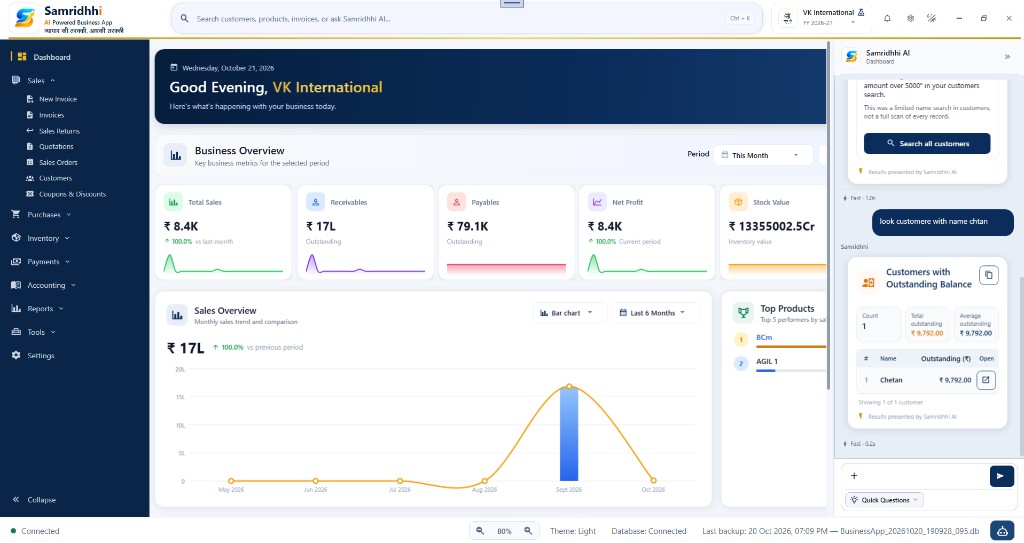
The Samridhhi Business App provides a unified workspace for sales, purchases, inventory, payments, accounting, reports, and AI-assisted business queries. The main window is divided into five primary areas:
- Top header and global search
- Left navigation menu
- Main workspace and dashboard
- Samridhhi AI assistant panel
- Bottom status bar
Top header
The top header stays visible while you work. It provides branding, search, company context, and common controls.
Application logo and branding
The top-left corner shows the Samridhhi logo, application name, and tagline:
Samridhhi — AI Powered Business App
व्यापार की तरक्की, आपकी तरक्की
Global search
Press Ctrl + K or click the search box to find:
- Navigation pages
- Customers, suppliers, products
- Sales invoices, purchase bills, quotations, orders
- Income and expense entries
You can also type business questions when Samridhhi AI search features are enabled in your build. Type at least 2 characters to see structured results; click a result to open it.
Company and financial year
The header shows the active company and financial year (for example, VK International and FY 2026–27). Reports, dashboard KPIs, and many lists respect this context. Change the financial year from the header dropdown when your role allows it.
Quick-access controls
The right side of the header includes icon controls for notifications, settings, theme, and window actions (minimize, maximize, close). Open Settings from the gear icon to configure company profile, invoices, preferences, Samridhhi AI, licensing, and more.
Left navigation menu
The sidebar lists the main modules. Sections with arrows expand or collapse to show submenu items.
Dashboard
Overview of business activity, financial metrics, charts, and summary cards. See also the Dashboard guide for KPI and chart details.
Sales
- New Invoice — start a sales invoice
- Invoices — view and manage sales invoices
- Sales Returns — sales return documents
- Quotations — quotations
- Sales Orders — sales orders
- Customers — customer master
- Coupons & Discounts — discount-related setup
Other modules
- Purchases — purchase bills, orders, and suppliers
- Inventory — products, stock, warehouses, and categories
- Payments — receipts and payments
- Accounting — ledger, income, expense, and journals (as configured)
- Reports — business and financial reports
- Tools — calculator, calendar, notes, and other utilities
- Settings — company, invoices, AI, database, license, and about
Collapse
Use Collapse at the bottom of the sidebar to narrow the menu and give more room to the main workspace.
Main workspace (dashboard)
When Dashboard is selected, the center area shows the welcome banner, business overview, sales chart, and top products.
Welcome banner
The banner shows the current date, a time-of-day greeting, the active company name, and a short introduction (for example, “Good Evening, VK International”). Use it to confirm business context before reviewing metrics.
Business overview
Metric cards summarize the selected reporting period (for example, This Month):
- Total Sales — sales for the period
- Receivables — amounts customers owe you
- Payables — amounts you owe suppliers
- Net Profit — profit for the period per app calculations
- Stock Value — inventory value
Cards may show comparison percentages or sparkline trends. Values depend on the selected period and your data.
Sales overview chart
Visual sales trend with chart type (for example, Bar chart) and range (for example, Last 6 Months). Use it to compare months and spot changes in activity.
Top products
Ranked products with bars or values as configured in the app. Use it to see strong performers in the current dashboard context; see report definitions for exact ranking rules.
Samridhhi AI assistant panel
The assistant opens as a panel on the right so you can ask questions while the dashboard or another screen stays visible.
Panel header
Shows Samridhhi AI and the current context (for example, Dashboard). Use expand/collapse controls as provided in your version.
Ask a business question
Type in the message area and send. Use clear, specific language — for example, find a customer by name, show outstanding balances, or look up a product. Responses depend on your data and supported AI capabilities.
Results may appear as structured cards (tables, metrics, actions) rather than plain text only. Review details before acting on them.
Result actions
Customer and similar cards may include Open to view a record, or Search all customers to continue in the full customer list workflow.
Quick Questions and timing
Quick Questions offers suggested prompts when available. Timing labels (for example, “Fast” and a duration) describe response speed, not guaranteed accuracy — always verify important figures in the relevant module or report.
Bottom status bar
- Connection — application connectivity (for example, Connected)
- Zoom — minus/plus controls and percentage (for example, 80%)
- Theme — active theme (for example, Light)
- Database — local database status (for example, Database: Connected)
- Last backup — timestamp and file name when backup is configured
- AI shortcut — icon at the bottom-right to open or focus the assistant (behavior may vary by version)
Notifications and theme
The bell icon may show calendar reminders, product expiry alerts, and app update notices. Toggle Light, Dark, or System theme from the header or Settings → Appearance.
Recommended workflow for new users
- Open the app and confirm company and financial year in the header.
- Review the Dashboard for activity and key metrics.
- Use the left menu to open the module you need.
- Use global search (Ctrl + K) for customers, products, invoices, and pages.
- Use Samridhhi AI for supported natural-language questions.
- Verify important numbers before decisions; edit records in the proper module.
- Check the status bar for database, zoom, theme, and backup information.
Important: Dashboard and AI values depend on selected periods and available data. Keep backups and test restore using your documented procedure. Samridhhi AI Powered Business App — व्यापार की तरक्की, आपकी तरक्की